WorkWave
Kiosk Mode
Designing a dual-platform system for facility services companies: a web admin experience for operations teams and a touch-first kiosk app for frontline workers to clock in and out without personal devices.
Client
WorkWave
My Role
Product Designer UX UI
Timeline
2024-2025
Deliverables
Requirements analysis · UX architecture · Interaction design · Responsive UI

Two surfaces, one system. A powerful admin experience for operations teams managing hundreds of devices — and a kiosk interface simple enough that a security guard on their first day needs zero training.
Overview
The challenge
Business Context
WorkWave is a US-based enterprise SaaS platform serving field service businesses: security companies, facility management, and pest control. Their frontline workers, including security guards, janitors, and facility staff, often operate in environments where issuing personal devices is impractical or cost-prohibitive.
The Gap
Before this feature, there was no standardised way to configure a shared device with location, job, and language rules, manage multiple devices at scale, or ensure compliance across a fleet of kiosk stations. Workers had to use personal phones or paper, creating punch errors, compliance gaps, and payroll issues.
How do we build an admin experience powerful enough for operations teams managing hundreds of devices, while keeping the employee-facing kiosk interface so simple that any frontline worker can use it in seconds?
Two Interconnected Surface Areas
Web platform: Admin & Supervisor tools to configure device templates and manage devices at scale. Role-based permissions, bulk operations, and compliance validation.
Kiosk app: A touch-first interface for frontline employees to clock in, clock out, and manage meal breaks without credentials or personal phones. Multilingual, offline-resilient, built for shared use.
Users & Personas
Who we're designing for
Three distinct user groups with different goals, permissions, and contexts. The design had to serve all three without compromising on security or simplicity.
Admin
Corporate Operations
Corporate/IT level, full system access across all locations and branches
Key Goals
Authorize jobs for kiosk use, manage all templates globally, remote device control, ensure compliance at scale
Supervisor
Location Manager
Branch-level manager, limited to their location's scope
Key Goals
Create/edit templates, enable kiosk mode on-device, assign devices to templates, monitor device fleet
Frontline Employee
Security Guard / Facility Worker
Warehouse, security post, facility, often multilingual, varying tech comfort
Key Goals
Clock in/out quickly, select job, manage meal breaks, with minimal friction and no training
Core constraint: Supervisors only see data within their location scope. Admins see everything. This permission layer shaped every list, dropdown, and filter in the system.
Design Process
From requirements to design decisions
The input document covered 16+ user stories across three feature modules. I mapped them into a structured hierarchy and drove answers to open design questions through deliberate decisions.
01
Requirements Analysis
Mapped 16+ user stories into three core modules: Template Management (web), Device Management (web), and Kiosk Experience (tablet). Identified dependencies, validation rules, and permission constrain
02
Design Questions Resolution
The requirements document flagged multiple open questions. I drove answers through design decisions: navigation patterns, permission-aware UI filtering, form validation strategy, save vs. cancel flows, and confirmation modals.
03
Wireframes & UX Architecture
Built wireframes covering both platforms. Established cascading relationships (location → job filtering), context-aware UI states (disable vs. hide patterns), and responsive behavior for portrait/landscape tablet use.
04
Interaction Design
Designed high-fidelity screens using the WinTeam design system. Reused established table/list components, modal patterns, and form controls. Designed custom kiosk interface with large touch targets and multilingual support.

Feature Deep Dives
Core features and design thinking
Three interconnected features, each solving a distinct problem while maintaining data consistency across the platform.
Feature 01 · Web Platform
Template Management
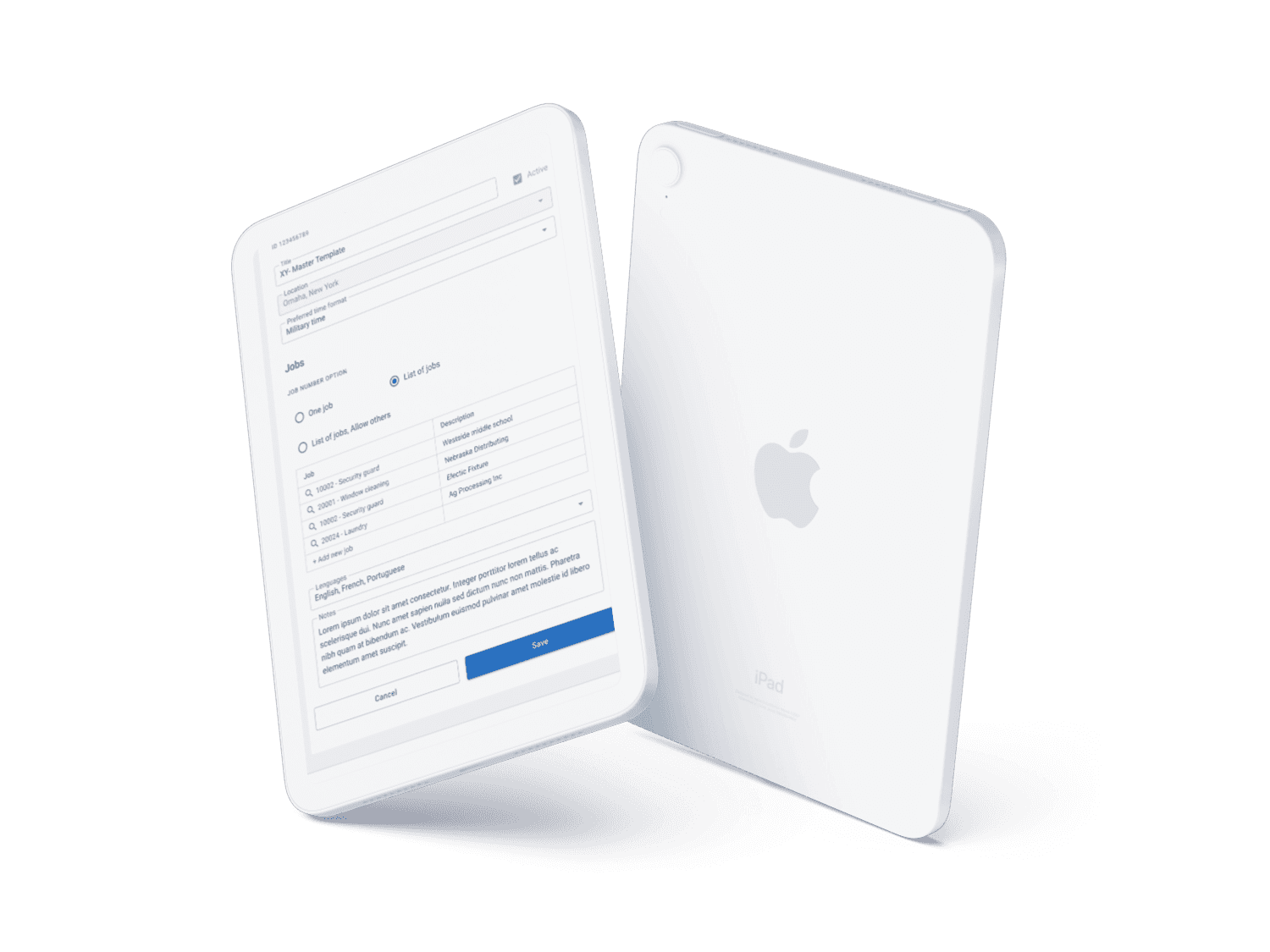
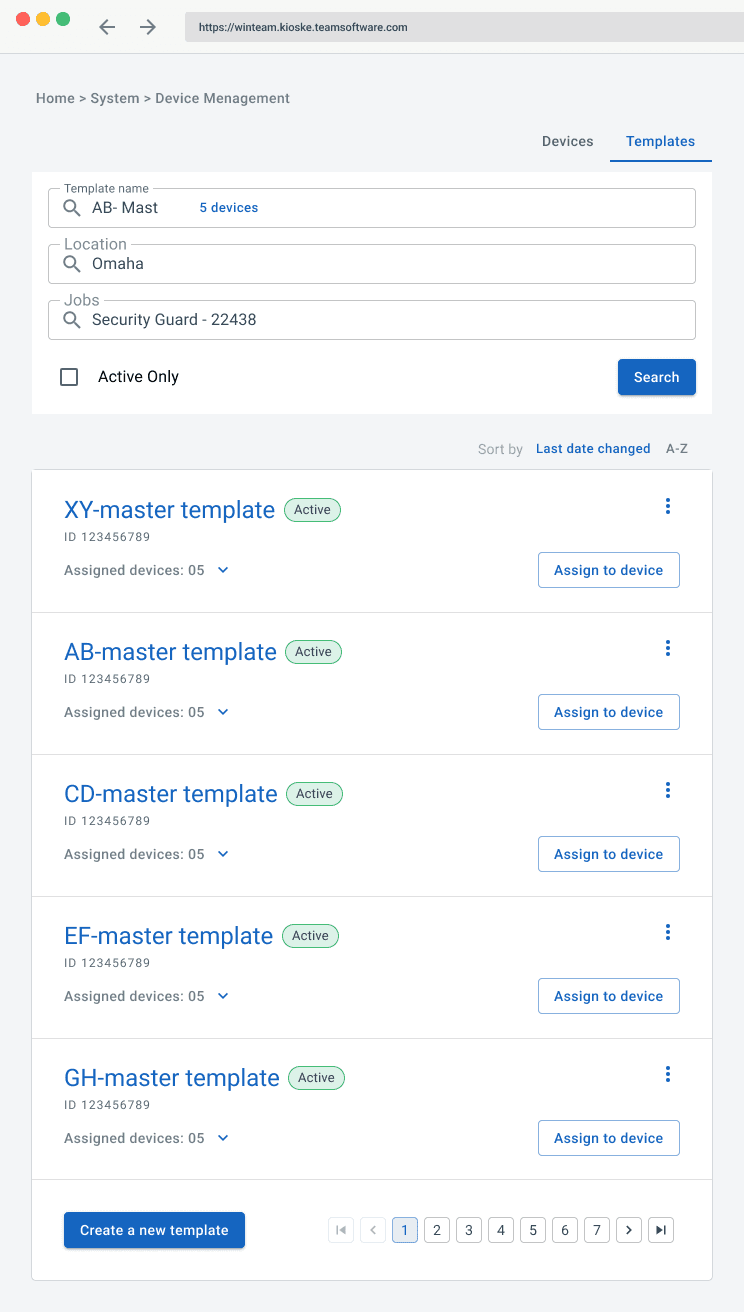
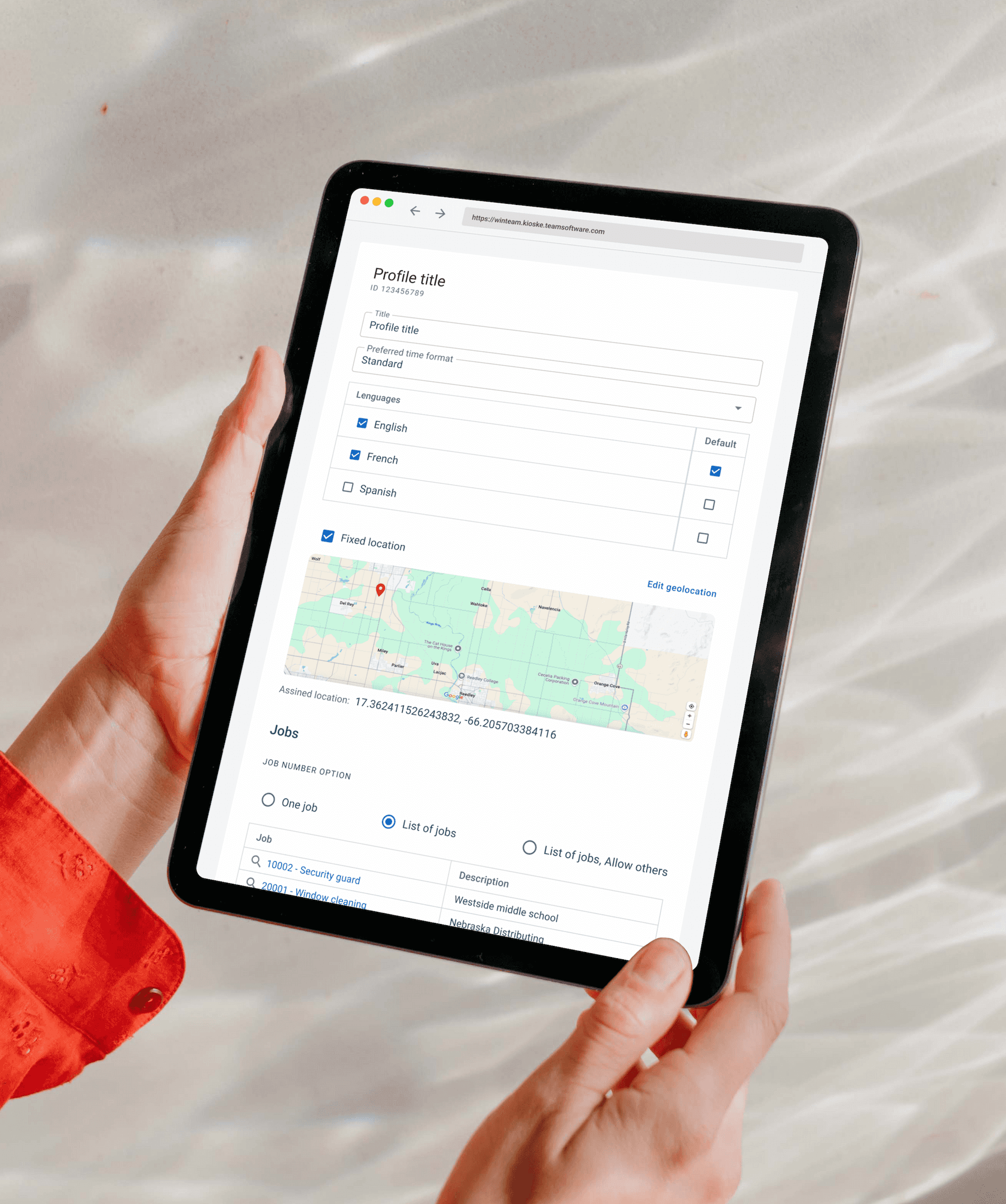
Operations teams need a reusable configuration unit , a "profile" they can apply to any device. A template bundles jobs, locations, language settings, time format, and geolocation rules.
Key Design Decisions
Location → Job dependency: When the user picks a location, the job list filters to only show jobs associated with that location. Validation prevents saving if jobs are orphaned.
Duplicate flow: Creates a prefilled form with "Copy of [Template Name]". All operational fields carry over; audit fields reset.
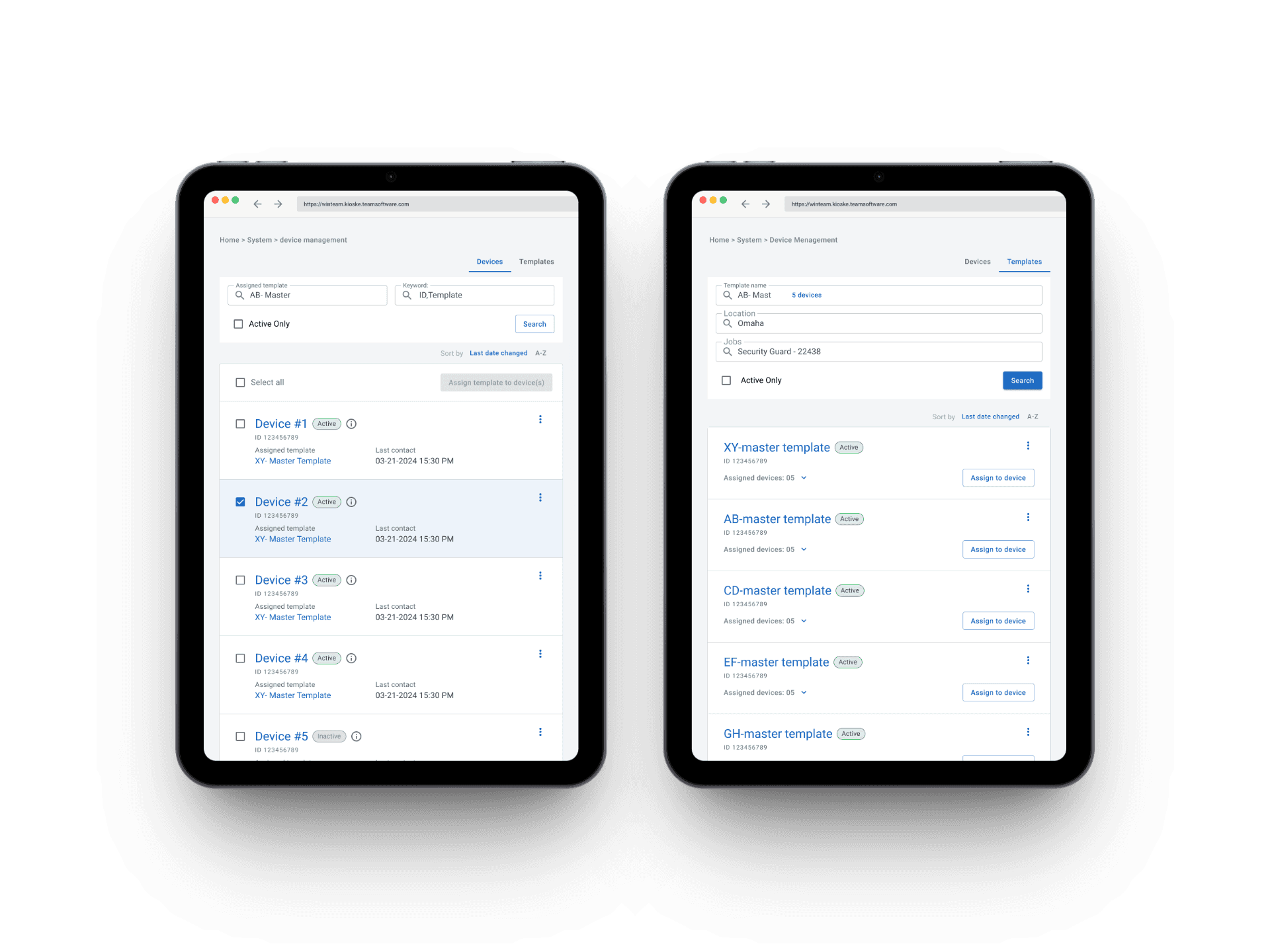
Template list: Defaults to active templates. The device count chip shows how many devices are assigned and expands inline without leaving the page.
Feature 02 · Web Platform
Device Management
Supervisors need to monitor a fleet of devices, see their status, assigned template, last heartbeat, and make targeted edits. Admins need remote control capabilities.

Key Design Decisions
Read-only vs. editable: A clear visual distinction between system-managed fields and user-editable ones, so supervisors always know what they can change and what the system controls.
Active status validation: Cannot activate a device assigned to an inactive template, toggle disabled with contextual message.
Remote disable (Admin): Admins can deactivate kiosk mode remotely. Only Supervisors can re-enable the device, deliberate asymmetry for accountability.
Bulk assignment: Supervisors can reassign multiple devices to a new template in one action , critical for scale operations managing dozens of locations.
Feature 03 · Tablet/Mobile
Kiosk Experience
A shared device in a high-traffic, time-sensitive context. Every extra tap is friction for workers trying to start or end a shift. The interface works for employees with varying language skills and tech comfort.
Design Principles in Action
One action per step: The entire clock-in flow is five taps, splash, employee ID, action, job selection, confirm. No menus, no navigation, no training required.
Context-aware actions: The system only shows what makes sense for each worker's current state. Clocked in? You see "Clock Out" and "Start Meal". Nothing else. Errors prevented before they happen.
Built for real environments: Audio and visual confirmation on every punch for noisy job sites. Multilingual support for English, Spanish, and French Canadian workers. Offline-resilient: punches queue locally and sync automatically when reconnected.
Design Decisions
Key choices
and why
The thinking behind the most important design decisions, not just what was built, but the reasoning that got there.
Decision 01
Permission-First Filtering
The UI pre-filters all dropdowns and lists to the user's allowed scope. A supervisor in Omaha never sees Chicago jobs, preventing errors by never showing data a user can't act on. Integrity and reduced cognitive load in one pattern.
Decision 02
Context-Aware Kiosk Actions
An employee clocked in sees only "Clock Out" and "Start Meal." Prevents duplicate punches without error messages, the right action is always obvious, not discovered through trial-and-error.
Decision 03
Asymmetric Enable/Disable Permissions
Admin can disable kiosk mode remotely; only Supervisor can re-enable from the device. Deliberate asymmetry, emergency control for Admins, accountability for Supervisors. Security and operational flexibility in balance.
Outcome
Design delivered
Design scope completed and handed off to the WorkWave engineering team. The Figma deliverable served as the single source of truth, resolving open requirements questions through design decisions rather than leaving them for development to figure out
Worked remotely as an independent contractor embedded in the US product team throughout the 16-week engagement.
↑
Faster Clock-ins
Workers start and end shifts in seconds, no queues, no paper, no personal devices needed
✓
Compliance by Design
Break rules and job requirements enforced through the interface, not through training or audits after the fact
⚡
Scale Without Friction
One template change propagates to every device at a location, operations teams manage fleets, not individual devices
$
Reduced Payroll Errors
Accurate time tracking at the point of punch eliminates the manual corrections that cost operations teams hours every pay cycle
"The requirements document surfaced a lot of open questions early. By resolving them through design decisions rather than leaving them for development, the Figma deliverable served as a shared source of truth that reduced back-and-forth during implementation."
— Design Process Reflection